Drive Employee Success with SCORM-Compliant Games and Gamification

Easily add your training content to proven game templates using The Training Arcade® game builder—no coding required. Then, take engagement even further by launching those games in Arcades™, our gamification platform that drives motivation, reinforces learning, and boosts training performance.
Talk to an Expert

Start Your Free Trial

"The Training Arcade provides 3 benefits for Siemen's global workforce. First, it allows us to reduce travel costs. Employees don't have to come to training centers; they can get the learning anytime, anywhere. Second, the analytics of the platform allows you to see the performance of the students, real-time. The third benefit is that it's gamification, this is what the next generation of the workforce is going to expect. The Training Arcade is a simple platform that creates an engaging and fun experience for the learner."

Mike Kovacs Manager, Technical Training and Digital Innovation Owner Siemens

"Who thought learning could be so fun! The Training Arcade has transformed how we approach knowledge! Our employees find it fun and informative. It's the perfect platform to leverage in the virtual space and move from presenting information to confirming knowledge."

Laurie Socia, Senior Project Manager, Marketing Product Comacst Cable

"Today we held our monthly sales meeting. Team members shared feedback on The Training Arcade games saying that they are fun, the points are motivating, and that each experience made them lean-in and think. Overall, we think it's a very engaging platform for learning!"

Patrick Nardi, Sales Training Manager Lundbeck Pharmaceuticals

TheTrainingArcade®_Logo_Lockup_Stacked-Light


Create training that’s more memorable, fun, & effective.

Add your training content to 12 awesome pre-built game templates (& build as many games as you want).


Select a game, add your training content, & share your game in minutes.
It’s that simple—no coding required!

TTA Steps_Icons-RGB_Generate Capture

Easy Game Set-Up

Select a game from the library of games in The Training Arcade, choose your question types, add your own training material and response feedback into the easy-to-use admin portal.

TTA Steps_Icons-RGB_Create

Add Rich Media

Choose a background theme and add your company logo. Use rich media such as video, images, and mp3 audio files to enhance your game and learner engagement.

TTA Steps_Icons-RGB_Share

Publish & Share

Publish your game to the web to share it with your learners. Or, download the files as a SCORM package to your LMS.

TTA Steps_Icons-RGB_Track

Measure Results

Monitor in-depth data analytics that reveal knowledge gaps and behavioral trends and help measure knowledge retention.

Take a self-guided tour!
 
AI feature icons_main

Jumpstart your game creation process with AI-generated questions and answer choices, and translate your game content within minutes

AI-Generated Questions & Answer Choices

Create content for your Trivia, Match, and Jump games in minutes with AI-generated questions and answers. Just fill in a prompt, add any specifics, select the number and types of questions, and let AI handle the rest. 

AI-Translated Game Content

Translate your game content into 19 different languages using the AI translations. This allows the learners from different backgrounds to select the language they would like to use to digest the training content.

Measure Everything and Prove Effectiveness

TTA Dashboard Analytics_Icons-RGB_Leaderboards

Leaderboards

Visualize the top performers and see who’s on top. Or share the data internally with admins only.

TTA Dashboard Analytics_Icons-RGB_Learner Data

Learner Data

Track each learner’s completion time, score, number of attempts, and rank.

TTA Dashboard Analytics_Icons-RGB_Question-level Data

Question-level Data

Evaluate which questions are most effective and improve those that aren’t.

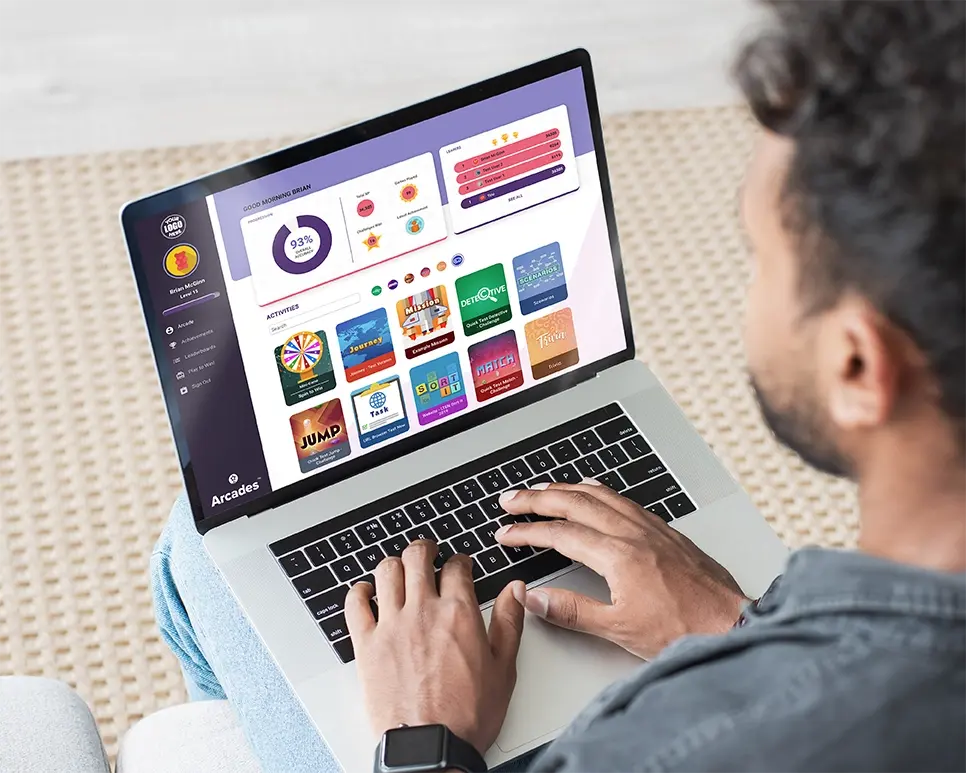
Arcades Laptop-cropped
ArcadesTM_Logo_Lockup_Stacked-Dark

Arcades™ delivers learner engagement and stickiness while providing tremendous data about player usage, knowledge improvement, and behavioral traits.

Arcades, a first-of-its-kind game-based training destination, will:

Icons_MaximizeEngagement

Maximize learner engagement.

Icons_IncreaseFrequency

Increase the frequency of learners’ interaction with content.

Icons_ImproveAccuracy

Improve accuracy and knowledge retention.

Use the Power of Play: Free eBooks on Learning Games

10 Ways to Publish Your Training Game

7 Types of Gameplay

TheTrainingArcade®_Logo_Lockup_Stacked-Light

Get ready to wow your learners with training games tailored to their learning needs. Customize games now with a free trial.

Frequently Asked Questions

What type of training courses are The Training Arcade® games best suited for?

The sky’s the limit. Subscribers use The Training Arcade to build training and reinforcement games focused on new-employee onboarding, sales and product training, leadership development, safety, security, compliance, systems/ processes, customer service, and many other training topics. The games can also be used to engage participants during large events and conferences.


How do I create a game?

The Training Arcade allows anyone to create a game in under 30 minutes (no coding required). The platform comes with 12 pre-built game templates, including JEOPARDY!® and Wheel of Fortune®. The game builder is remarkably intuitive and can be managed using drop-downs, uploads, and type-in fields. Below are the steps required to create a game:

  • Choose your basic game information

  • Define global game settings

  • Identify SSO integration, user registration, and leaderboard display

  • Pick from visual templates and audio tracks

  • Customize the splash screen with logo, title, images, etc.
  • Write pop-up information to provide players with context before they play the game

  • Start adding questions (choosing from 5 types), uploading media, identifying right/wrong answers, and writing corrective feedback

  • Translate the game into 17 other languages

  • Publish a game with an easy-to-share URL

What types of user data (analytics) can I track?

The Training Arcade’s analytics dashboard is engineered to reveal patterns of individual and group engagement with your material, thereby improving your training ROI by identifying knowledge gaps, personality traits, and group comparisons.

  • View and sort topline data, including the number of users, scores, rank, sessions, session duration, % of questions correct/incorrect, and total questions answered.

  • Analyze individual outcomes by looking at all sessions played, how each player answered each question by session, how many attempts it took them before answering a question correctly, and identify insights into knowledge acquisition and retention.

  • Review macro trends for each question, including time required to answer, the number of times players have attempted to answer, and the % of time players have answered correctly/incorrectly.

  • Dig deeper into each answer to identify any misperceptions.

  • Sort data by date for comparison purposes and export as a CSV file to share with stakeholders

What question types can I create?

The Training Arcade includes 6 question types (not all games have every question type). These include: Multiple choice, Multi-select, Image select, Text input, Polling, and Info card.

How do I add The Training Arcade games to my LMS?

The Training Arcade games can all be published as SCORM 2004: 3rd Edition and SCORM 1.2 packages for easy integration into the majority of LMS.

ELB Learning is proud to offer our subscribers engagement-enhancing, time-saving generative AI features within many of our solutions. Our intent is to provide these features in a way that meets your organizational requirements for control, transparency, security, confidentiality protections, and IP ownership. Learn more about our Generative AI Policy at this link.